
Moor part · Menu bar
Your menu bar, your way.
Moor Bar is Moor's own menu bar, drawn over Apple's on every display. Arrange it in three zones, put any Moor widget in it, and give it the look of your docks. The Apple menu and the app's menus still open the real ones. Your AI agent can design it too.
Stands in for Apple's menu bar. Included with Moor, off until you turn it on.
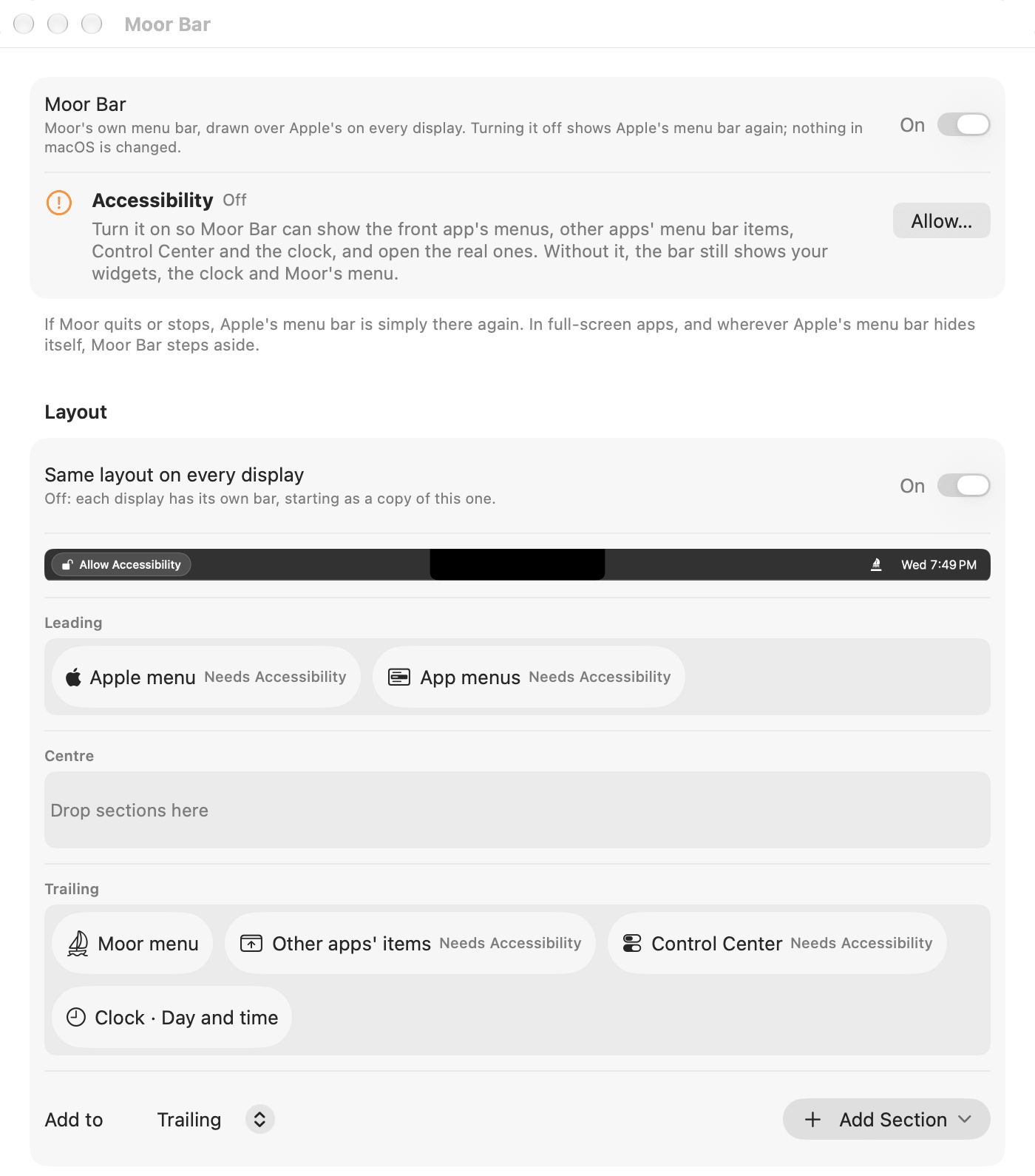
What Moor Bar does
Three zones
Leading, centre and trailing. Drag sections between them in Settings → Moor Bar, and see the result in a preview.
Everything Apple's bar does
The Apple menu and the front app's menus open the real menus, right under Moor's titles. Other apps' items show as their icons and open their own menus. Spotlight, Siri and Control Center open the real ones.
A clock your way
A preset or any date pattern, like Fri 15 Jan 9:41.
Any widget
Any of Moor's 50 widgets as one line. Click one for the whole widget, right under the bar.
Its own look
Match a dock theme, or pick a colour, gradient or glass, with your own colours for light and dark mode. Full width or a floating island. Text always stays readable.
Every display, every profile
One layout everywhere, or a different bar on each display. A profile can have its own bar. Nothing is drawn in the notch.
Nothing in macOS changes
Apple's menu bar stays underneath. If Moor quits, it's simply there again. In full screen, Moor Bar steps aside.
From agents
The
moor_barMCP tool, the local API andmoor barcan read and change the layout and the look.
Apple's menu bar, or Moor Bar?
macOS lets you choose and arrange menu bar icons. Here is what Apple's guide for macOS 26 says, next to Moor Bar.
| Task | macOS 26 | Moor Bar |
|---|---|---|
| The app's menus and other apps' icons | Yes (source: support.apple.com, checked 28 October 2026) | Yes (see the Moor Bar docs)The real ones. Needs Accessibility |
| Rearrange menu bar icons | Yes (source: support.apple.com, checked 28 October 2026)⌘-drag an icon | Partly (see the Moor Bar docs)Moor's own sections. Other apps' icons come as one section |
| Widgets and your own text in the menu bar | Not stated (source: support.apple.com, checked 28 October 2026) | Yes (see the Moor Bar docs)Any Moor widget |
| A clock in any format | Not stated (source: support.apple.com, checked 28 October 2026) | Yes (see the Moor Bar docs) |
| A different menu bar on each display | Not stated (source: support.apple.com, checked 28 October 2026) | Yes (see the Moor Bar docs) |
| Changed by an AI agent | Not stated (source: support.apple.com, checked 28 October 2026) | Yes (see the Moor Bar docs)moor_bar |
Pick a macOS answer to open the Apple Support page it came from, read 28 October 2026. Not stated means Apple's page doesn't mention it, which is not the same as no. Where macOS wins: Apple's menu bar is built in and needs no permission. Moor Bar needs Accessibility to show the app's menus and other apps' icons.
Turn it on
Open Settings → Parts
In Moor's menu bar menu, choose Settings, then Parts.
Switch Moor Bar on
It starts at once. Turn it off and its shortcuts, windows and menu bar items go away.
Find it in Settings → Moor Bar
Moor Bar gets its own page in Settings while it's on.
Only the Docks are on when you start. Every part comes with every license and trial, at no extra cost. Or from Terminal: moor parts enable bar.
Permissions
- Accessibility
- For the Apple menu, the app's menus, other apps' items and Control Center. Without it, the bar shows one Allow Accessibility button in their place.
- Nothing else
- Moor's menu, the app name, the clock, widgets, your text and the look need no permission.
Moor asks only when you turn on the feature that needs it. Permissions in detail →
Shortcuts
| Open the menu bar | Your choice: none is set at first |
|---|---|
| Move between menus | ← → |
| Close the menu | Esc |
| Apple's menu bar shortcut | ⌃F2 still works |
| A widget's panel | Click the widget |
| What doesn't fit | Click » in the trailing zone |
Pick the shortcut in Settings → Shortcuts. Arrange the bar in Settings → Moor Bar. Every shortcut →
More about Moor Bar
Try Moor Bar free for 14 days
$29 once, 14-day free trial, no card
$– – of – left at this price then $–
macOS 26 (Tahoe) or later, Apple silicon. Quit Moor and Apple's Dock comes right back.